
Plotting Networks#
This tutorial walks through plotting phylogenetic networks step by step, using the Xiphophorus swordfish reticulate phylogeny from [Holtgrefe et al., 2025] as a running example: loading the rooted network, previewing it in the terminal, plotting it with the PhyloZoo layouts, converting it to a semi-directed network and plotting that, and finally styling and saving a publication-ready figure.
Prerequisites: phylozoo[viz] installed (pip install phylozoo[viz]).
Loading the Network#
The network is given as an eNewick string; loading it as a
DirectedPhyNetwork keeps the root of the string:
from phylozoo import DirectedPhyNetwork

NEWICK = (
    "((Ps.jonesii,((((X.evelynae,(X.xiphidium,(X.maculatus)#H1)),"
    "(((X.meyeri,X.couchianus),X.gordoni),X.milleri)),X.variatus),"
    "((#H1,((((((X.multilineatus,X.nigrensis),(X.pygmaeus,X.continens)),"
    "((X.malinche,X.birchmanni),(X.cortezi)#H2)),(X.montezumae,"
    "(#H2,X.nezahualcoyotl))),((X.signum,(X.hellerii,(X.mayae,"
    "X.alvarezi))))#H3),(#H3,(X.clemenciae,X.monticolus)))),X.andersi))));"
)

dnet = DirectedPhyNetwork.from_string(NEWICK, format="enewick")
print(dnet.number_of_nodes(), "nodes,", len(dnet.taxa), "taxa,", len(dnet.hybrid_nodes), "hybrid nodes")
# 56 nodes, 25 taxa, 3 hybrid nodes
Taxon names containing spaces must be replaced with underscores or dots (the parser does not
accept quoted names). Back-references like #H1 link the two incoming edges of a hybrid node.
Previewing in the Terminal#
Before plotting anything, preview()
draws the network as text, root on the left and leaves on the right. It needs no matplotlib:
dnet.preview()
      ┌─────────────────────────────────────────────────────────────────────────────● Ps.jonesii
      │
      │           ┌─────────────────────────────────────────────────────────────────● X.andersi
      │           │
      │           │                                                           ┌─────● X.multilineatus
      │           │                                                     ┌─────●
      │           │                                                     │     └─────● X.nigrensis
      │           │                                               ┌─────●
      │           │                                               │     │     ┌─────● X.continens
      │           │                                               │     └─────●
      │           │                                               │           └─────● X.pygmaeus
      │           │                                         ┌─────●
      │           │                                         │     │           ┌─────● X.birchmanni
      │           │                                         │     │     ┌─────●
      │     ┌─────●                                         │     │     │     └─────● X.malinche
○─────●     │     │                                   ┌─────●     └─────●
      │     │     │                                   │     │           └┄┄┄┄>◆─────● X.cortezi
      │     │     │                                   │     │                 ^
      │     │     │                                   │     │     ┌───────────●─────● X.nezahualcoyotl
      │     │     │                                   │     └─────●
      │     │     │                                   │           └─────────────────● X.montezumae
      │     │     │                             ┌─────●
      │     │     │                             │     ┊                       ┌─────● X.alvarezi
      │     │     │                             │     ┊                 ┌─────●
      │     │     │                             │     ┊           ┌─────●     └─────● X.mayae
      │     │     │                             │     ┊           │     │
      │     │     └───────────────────────●─────●     └┄┄┄┄>◆─────●     └───────────● X.hellerii
      │     │                             ┊     │           ^     │
      │     │                             ┊     │           ┊     └─────────────────● X.signum
      └─────●                             ┊     │           ┊
            │                             ┊     │           ┊     ┌─────────────────● X.clemenciae
            │                             ┊     └───────────●─────●
            │                             ┊                       └─────────────────● X.monticolus
            │                             v
            │                       ┌┄┄┄┄>◆─────────────────────────────────────────● X.maculatus
            │                 ┌─────●
            │           ┌─────●     └───────────────────────────────────────────────● X.xiphidium
            │           │     │
            │           │     └─────────────────────────────────────────────────────● X.evelynae
            │           │
            │     ┌─────●                 ┌─────────────────────────────────────────● X.couchianus
            │     │     │           ┌─────●
            │     │     │     ┌─────●     └─────────────────────────────────────────● X.meyeri
            │     │     │     │     │
            └─────●     └─────●     └───────────────────────────────────────────────● X.gordoni
                  │           │
                  │           └─────────────────────────────────────────────────────● X.milleri
                  │
                  └─────────────────────────────────────────────────────────────────● X.variatus
Solid lines are tree edges, dotted lines with an arrowhead are hybrid edges, ◆ is a hybrid
node and ○ the root.
Plotting a Directed Network#
All plotting goes through plot(), which picks a default layout per network
class; pass layout= to choose another one and layout options as keyword arguments. In every
drawing hybrid nodes are pink and hybrid edges red with an arrowhead at the hybrid node.
pz-cladogram#
The default layout for directed networks is a rectangular layered drawing with the root on the left and the leaves aligned in a column on the right, with horizontal labels, which suits long taxon names. Every node hangs off one of its parents, sibling subtrees stay together, and where the network allows it the parent of a hybrid edge is lowered onto the hybrid’s layer so the edge is horizontal. Only hybrid edges carry an arrowhead, since the direction is implied by the drawing.
from phylozoo.viz import plot

ax = plot(dnet)
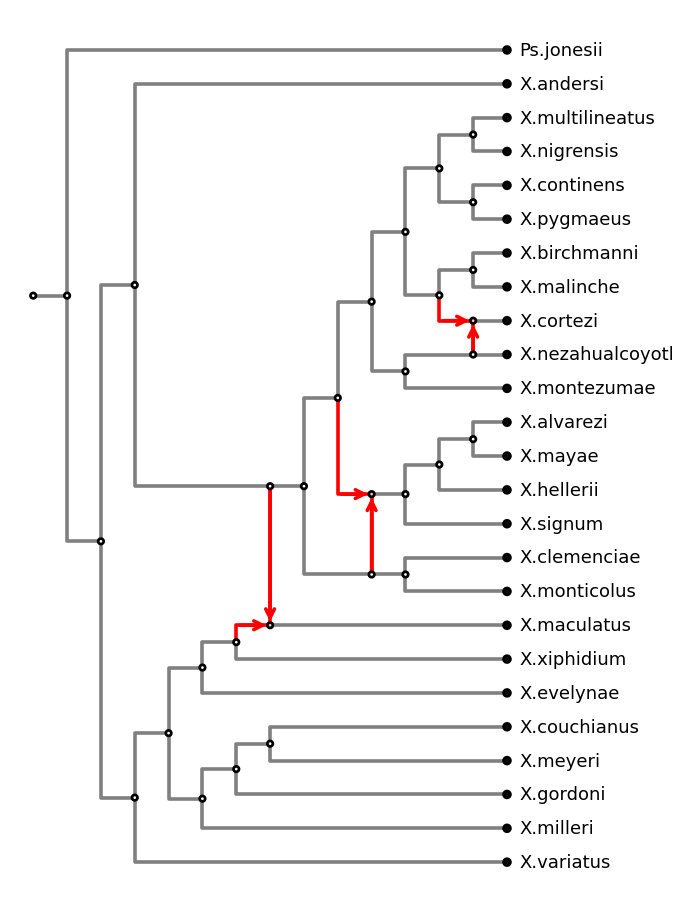
plot(dnet): the default pz-cladogram layout.#
direction="TD" puts the root at the top and the leaves aligned at the bottom
(rectangular=False gives straight edges in either direction):
ax = plot(dnet, direction="TD")
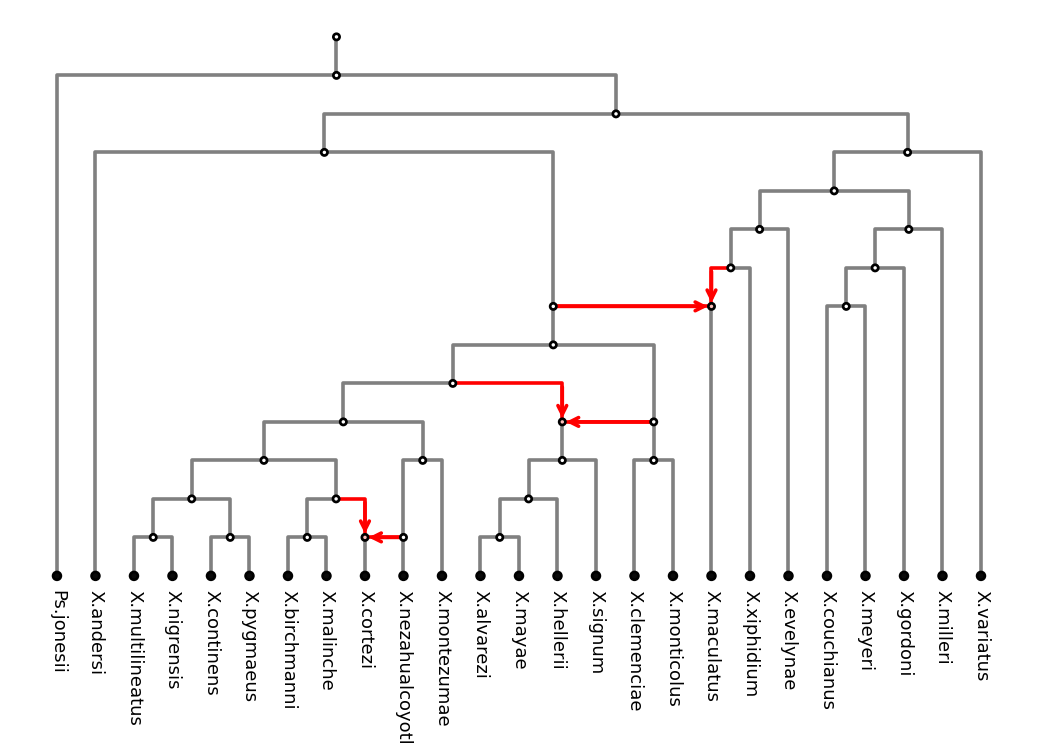
pz-cladogram with direction="TD".#
pz-layered#
A layered layout in the style of Graphviz dot: nodes of a layer are ordered freely (no tree
backbone), which gives fewer crossings on heavily reticulate networks at the cost of sibling
subtrees not staying together. Leaves keep their own depth by default; align_leaves=True
puts them on the bottom row:
ax = plot(dnet, layout="pz-layered", align_leaves=True)
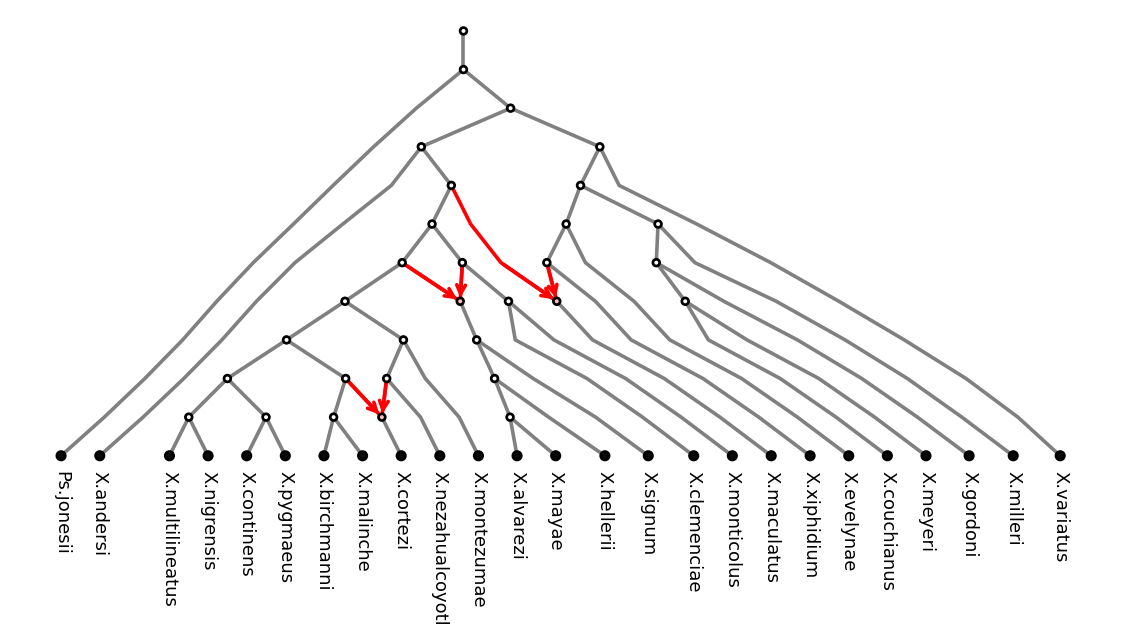
pz-layered with align_leaves=True.#
pz-radial#
A circular cladogram: root at the centre, leaves evenly spaced on the outer circle, hybrid edges as chords:
ax = plot(dnet, layout="pz-radial")
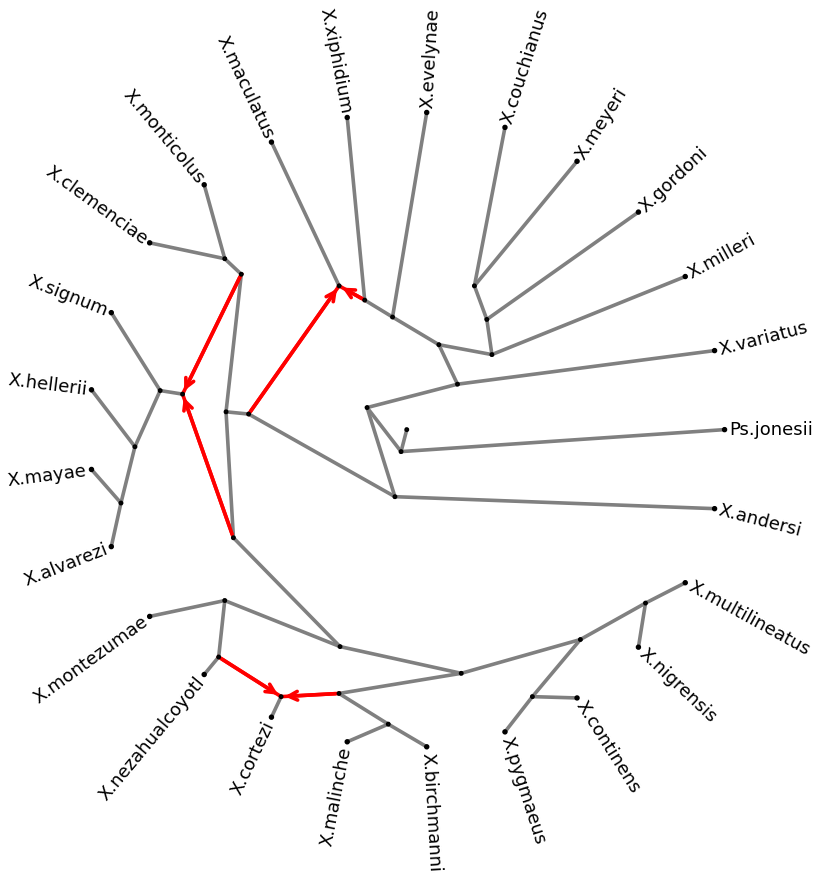
pz-radial.#
The unrooted pz-unrooted layout of the next section can be used for directed networks as
well; the root is then an ordinary node, marked in gold. All layouts are deterministic; their
options and the generic NetworkX and Graphviz layouts are listed in the
plotting manual.
Plotting a Semi-Directed Network#
Converting to a Semi-Directed Network#
A SemiDirectedPhyNetwork forgets the
root: the hybrid edges keep their direction, every other edge becomes undirected. Convert the
rooted network with
to_sd_network() (an eNewick string can also be
loaded as a semi-directed network directly with SemiDirectedPhyNetwork.from_string):
from phylozoo.core.network.dnetwork.derivations import to_sd_network

sd = to_sd_network(dnet)
print(sd.number_of_nodes(), "nodes,", len(sd.taxa), "taxa,", len(sd.hybrid_nodes), "hybrid nodes")
# 54 nodes, 25 taxa, 3 hybrid nodes
The two nodes fewer are the root and its now-suppressed neighbour.
pz-unrooted#
The default layout for semi-directed networks draws the tree of blobs first and each blob (the reticulate parts of the network) as a polygon in the space reserved for it, so cut edges never cross blob edges; a short relaxation then spreads the drawing. Leaf labels read outwards along their pendant edge.
ax = plot(sd)
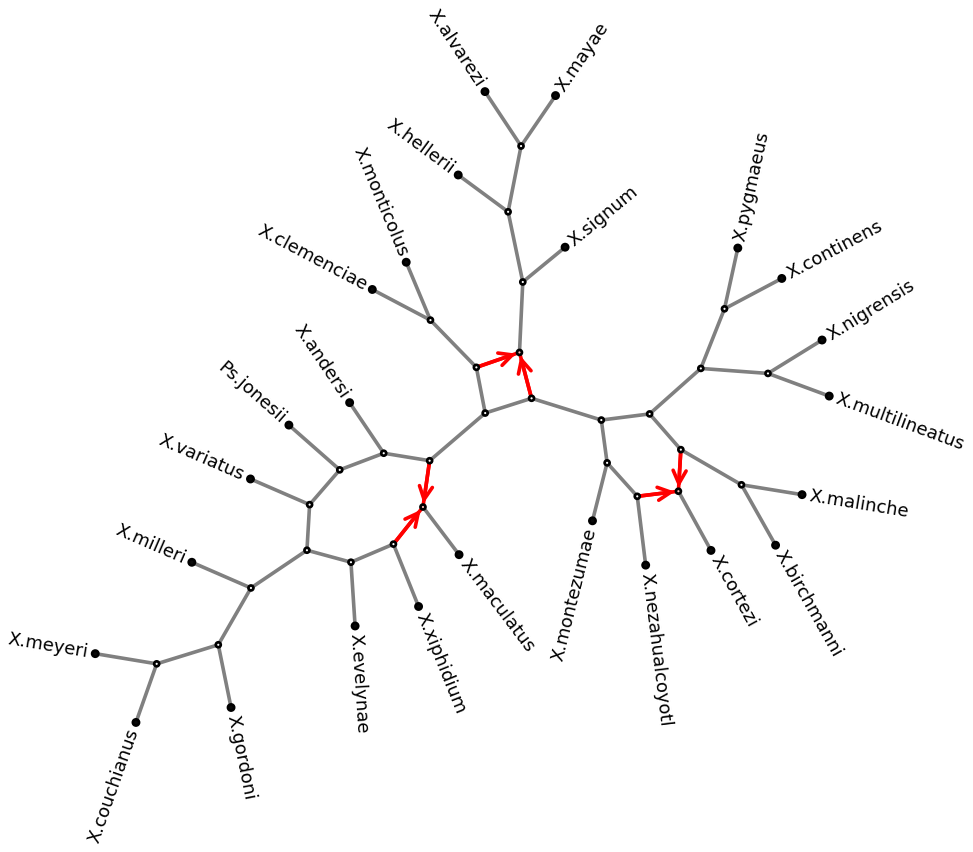
plot(sd): the default pz-unrooted layout.#
pz-radial is available for semi-directed networks too (the network is rooted first,
root_location chooses where), and sd.preview() works like the directed one.
Customising the Style#
Pass a style object to control colours, node sizes and label placement:
SDNetStyle for semi-directed networks,
DNetStyle for directed ones (same attributes, plus
arrows and the root options):
from phylozoo.viz.sdnetwork.style import SDNetStyle

style = SDNetStyle(
    node_size=60,               # internal node size
    leaf_size=140,              # leaf node size (overrides node_size for leaves)
    node_color="#dddddd",       # internal node fill
    leaf_color="#1f4e79",       # leaf fill
    hybrid_color="#f5b041",     # hybrid node fill
    edge_color="#555555",       # tree edges
    hybrid_edge_color="#d35400",  # hybrid edges
    edge_width=1.6,
    label_offset=0.012,         # distance from node centre to label
    label_font_size=11,
)
ax = plot(sd, style=style)
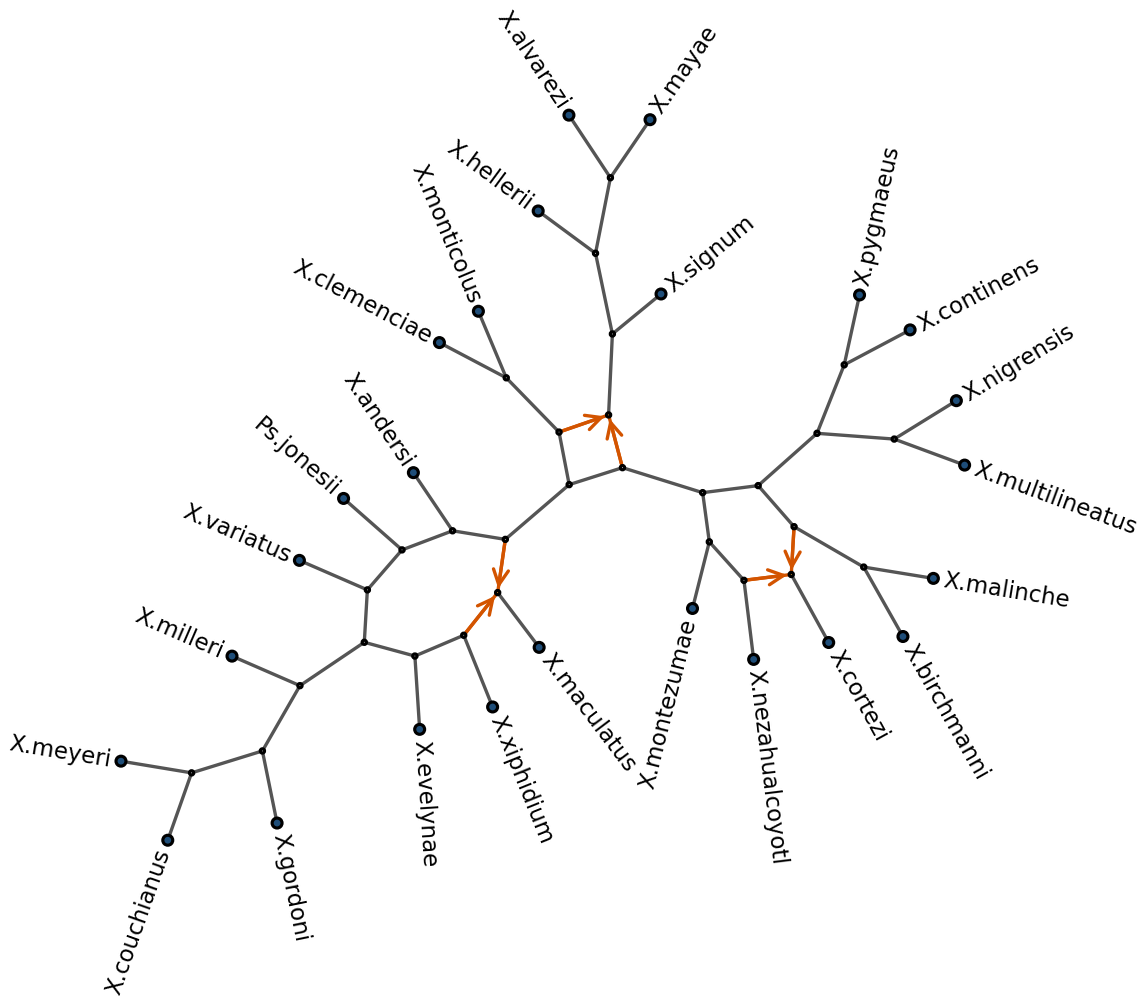
Semi-directed phylogenetic network of 25 Xiphophorus species with three hybridisation events (H1–H3) [Holtgrefe et al., 2025], with the style above.#
Key style attributes:
node_size/leaf_size— size of node circles (arbitrary units; 100 ≈ small dot).node_color/leaf_color/hybrid_color— any matplotlib colour string.edge_color/hybrid_edge_color/edge_width— edge colours (defaults"gray"and"red") and width.label_offset— label distance from node centre in layout coordinates.label_font_size— matplotlib font size.label_rotation—None(default) aligns each label with its edge; a fixed angle such as0keeps all labels horizontal, placed beside the node on its outward side.arrows(directed only) —'all','hybrid'or'none';None(default) draws arrowheads on hybrid edges only in the layered and radial layouts and on all edges otherwise.
Saving to File#
To save the figure above, pass an existing axes to embed the plot in a figure, then save:
import matplotlib.pyplot as plt

fig, ax = plt.subplots(figsize=(10, 7))
plot(sd, ax=ax, style=style)
fig.savefig("xiphophorus.png", dpi=150, bbox_inches="tight", pad_inches=0.05)
Use bbox_inches="tight" to crop whitespace and pad_inches to control the remaining
margin. For a publication-quality PDF, replace .png with .pdf.
See Also#
Plotting manual — Full reference for layouts and parameters
Styling manual — All style attributes explained